Buying eufy X9 Pro replacement parts: model names, part references and compatibility statements
eufy X9 Pro replacement parts compatibility: check the exact model statement
TL;DR: ReplaceMen explicitly lists its 11-piece replacement kit for the eufy X9 Pro, even though the same page also uses “X9 Series”. The decisive wording is the seller’s specific X9 Pro statement. Treat that as a documented compatibility claim by ReplaceMen; independent verification of physical fit is a separate question.
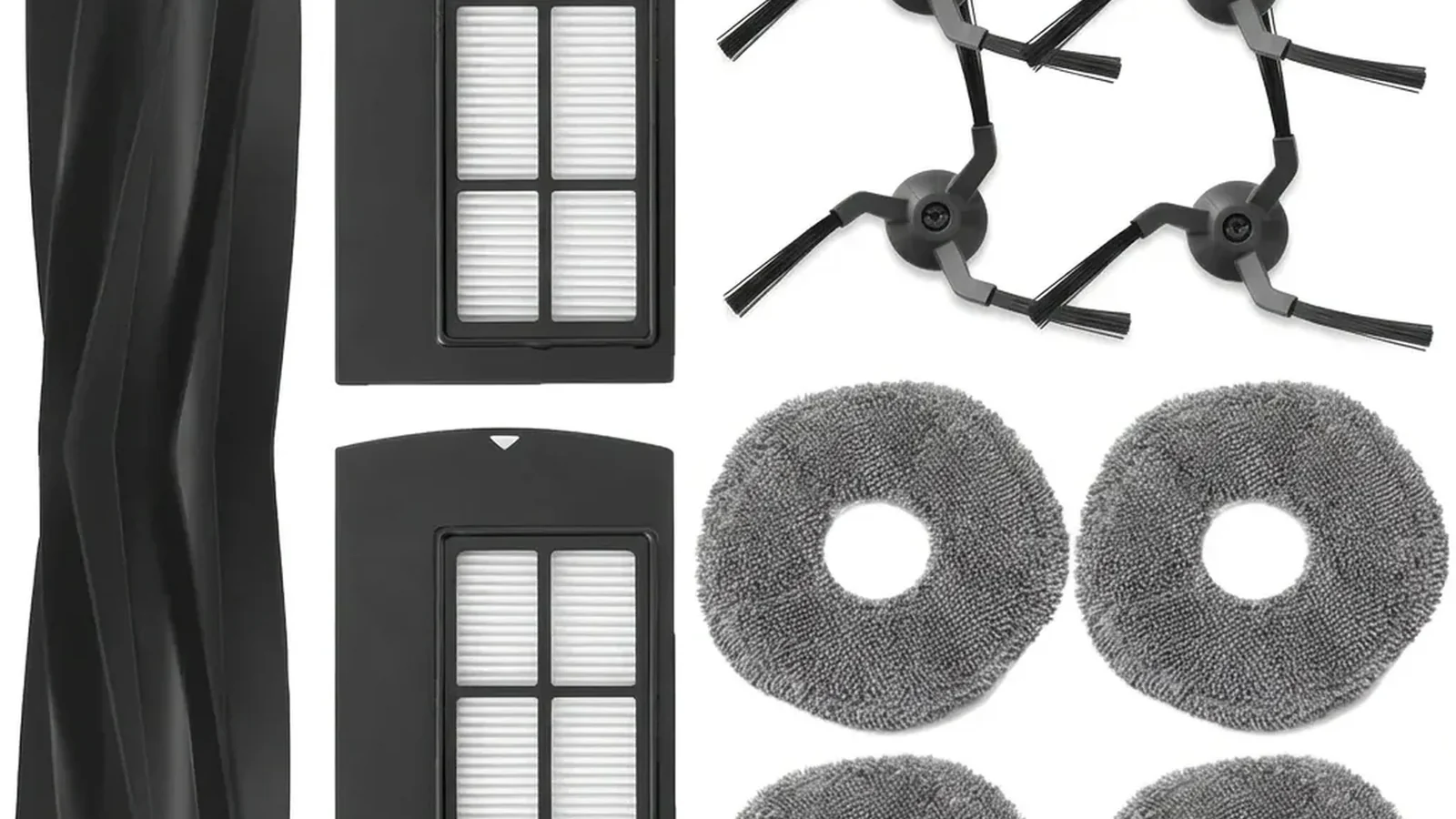
If you are looking at a kit labelled “X9 Series”, start by reading the model on your robot, then look for “X9 Pro” in the exact product description you intend to order. This is also the check ReplaceMen asks buyers to make: “Read the model on the robot before you order.”
What the ReplaceMen listing actually confirms
ReplaceMen’s compatibility answer reads: “eufy X9 Pro / X9 Series. Read the model on the robot before you order. This kit is for the eufy X9 Pro.” For this particular listing, you therefore do not have to infer the intended model from the series label alone: the seller expressly names X9 Pro.
ReplaceMen describes the bundle as one rolling brush, four side brushes, two filters and four mop pads — 11 pieces. That identifies the advertised bundle; it does not turn every other product carrying an “X9 Series” label into the same kit.
Use a clear buying boundary
Our recommended rule is to shortlist the exact kit or accessory only when its own description names your model. If another listing says only “X9 Series”, ask the seller to confirm in writing that the selected item is intended for the eufy X9 Pro before ordering.
Keep the conclusion precise: this ReplaceMen kit is explicitly advertised for X9 Pro. That answers the model-identification question without presenting the seller’s statement as an independent fitting test.
Check compatibility for the particular accessory you are buying
An individual accessory needs its own model check. The official listings below provide a useful reference because each expressly names X9 Pro; the side-brush and mop-cloth listings also name X10 Pro Omni.
| Accessory listing | Advertised contents | Explicit compatibility wording |
|---|---|---|
| Official Accessory Kit for X9 Pro | Two side brushes, one rolling brush, two mopping cloths and one filter | “Compatible with RoboVac X9 Pro” |
| Official X9 Pro replacement filter listing | Two replacement filters | “Compatible with X9 Pro” |
| Official replacement side-brush listing | Two replacement side brushes | “Compatible with X9 Pro and X10 Pro Omni.” |
| Official washable mop-cloth listing | Two washable vacuum mop cloths | “Compatible with eufy X10 Pro Omni and eufy X9 Pro robot vacuums.” |
Use these as accessory-specific statements. The shared side-brush and mop-cloth listings support those advertised accessories being listed for both models. Do not extend that conclusion to a different roller, filter or complete kit without checking its own compatibility wording. Equally, an X9 Pro-only statement does not by itself establish that the item is incompatible with every other model; it simply gives you an explicit X9 Pro reference.
A practical check before ordering
- Record your robot’s model. Use the model written on the robot as your starting point, rather than a remembered series name.
- Open the exact item you plan to buy. Look for X9 Pro in that item’s compatibility text. If there are selectable variants, check the one you intend to order.
- Match the accessory and quantity. Compare a filter with a filter, and a kit with its stated contents. The official kit and the ReplaceMen bundle have different advertised quantities: the official kit lists two side brushes, one rolling brush, two mopping cloths and one filter; ReplaceMen lists four side brushes, one rolling brush, four mop pads and two filters.
- Keep unclear candidates unresolved. If the selected listing lacks an explicit X9 Pro statement, ask the seller for confirmation rather than borrowing the wording from another accessory page.
How to use dimensions without overstating them
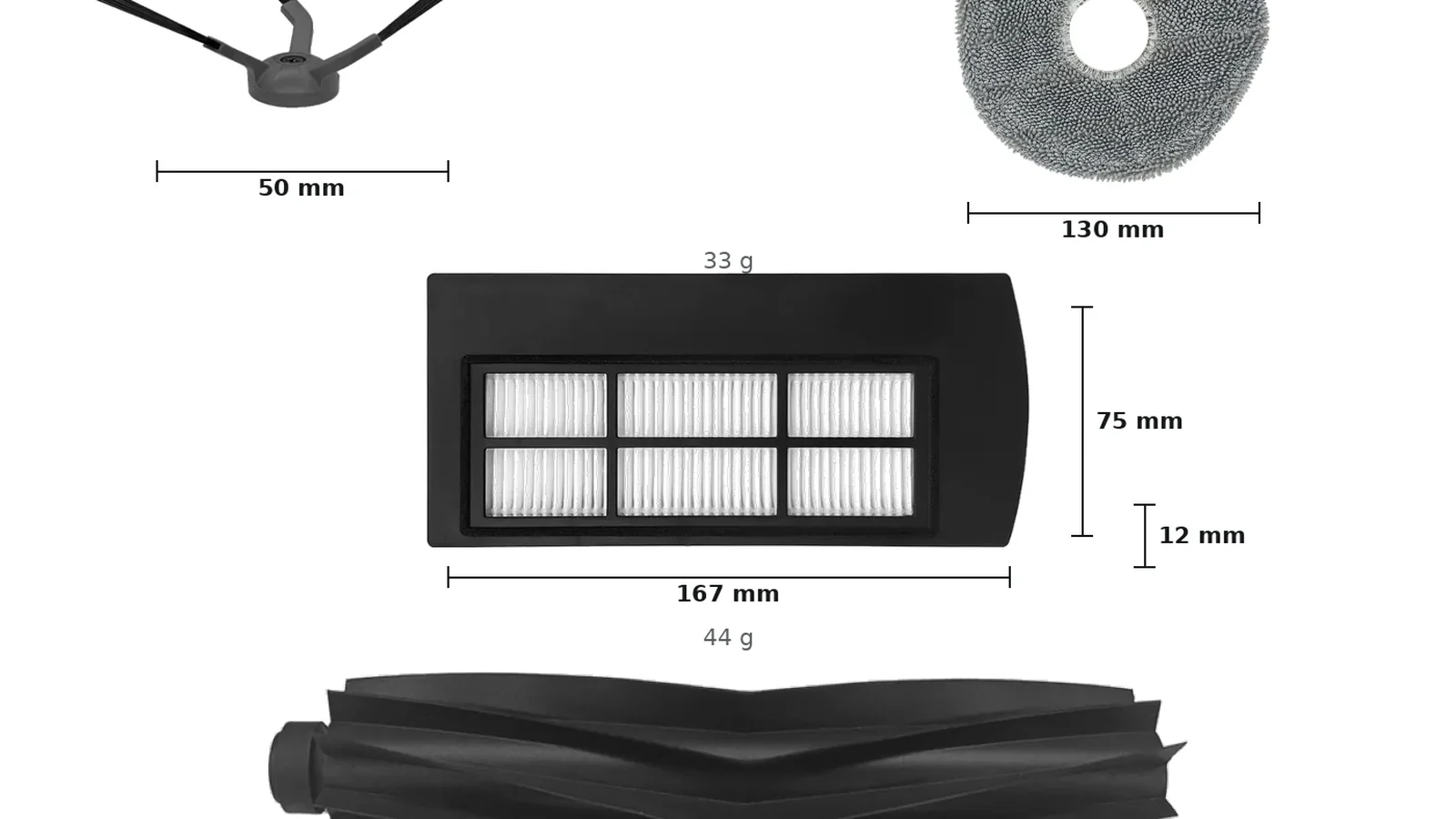
ReplaceMen advertises a 173 mm rubber rolling brush, filters measuring 167 × 75 × 12 mm, round 130 mm mop pads and side-brush arms measuring 50 mm. Those are ReplaceMen’s stated specifications for its bundle.
For this buying check, use measurements as a supplementary comparison, not as a substitute for a model statement. A matching measurement alone would leave the central question unanswered: does the seller explicitly list this particular item for X9 Pro? If you have only measurements, request that confirmation before treating the candidate as model-matched.
This method assesses what a listing says. It does not certify mounting tolerances, filtration performance or the physical fit of an untested part.
Choose a listing with an explicit X9 Pro match
Use the exact accessory’s model statement to decide your next step. A product explicitly listed for X9 Pro can pass your initial listing check; a candidate described only by a series name or dimensions should remain unresolved until the seller clarifies it. Passing this check means you have found an advertised model match, not completed an independent fit assessment.
Go to the source for your intended purchase
- Checking the “X9 Series” bundle? The ReplaceMen 11-piece kit listing explicitly says the kit is for eufy X9 Pro. Read that statement alongside the contents of the bundle you intend to order.
- Checking the official complete accessory kit? The Accessory Kit for X9 Pro on Anker’s UK site states “Compatible with RoboVac X9 Pro”.
- Checking an individual filter? The official replacement filter listing states “Compatible with X9 Pro”.
- Checking a side brush advertised for two models? The official side-brush listing expressly names X9 Pro and X10 Pro Omni.
- Checking shared mop cloths? The official washable mop-cloth listing expressly names X9 Pro and X10 Pro Omni in its compatibility bullet.
Before paying, check the selected item’s current price, delivery destination and availability on the seller’s page. Use the linked listings to inspect compatibility wording; do not assume that commercial terms from one storefront apply to another.
If the wording is still unclear
Send a focused enquiry such as: “My robot is a eufy X9 Pro. Does this exact item, in the selected variant, have stated compatibility with X9 Pro? Please confirm which kit or accessory your answer covers.” Include the product link so the seller can answer about the item you are considering.
If the answer only repeats “X9 Series” or provides measurements, keep looking for an explicit X9 Pro statement. If the question concerns actual fit despite a clear listing, ask for evidence addressing that concern rather than treating the model wording as a fitting test.